Installing Black Magic
This guide provides step-by-step instructions for users who need to reinstall Black Magic or set it up on a different computer.
Download Instructions
- Navigate to the Black Magic download page at My Software after logging in
- Enter your username and password (the same credentials used for downloading race cards)
- The system will verify your Black Magic purchase and begin the download
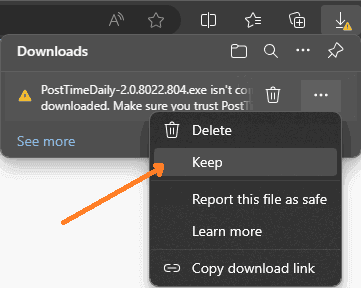
Browser Download Warnings
Windows may flag the download as suspicious. Your browser will offer an option to override this protection and retain the file.
Installation Steps
Once downloaded, find the installer file in your browser's download folder or notification area, then double-click to execute it.
Critical reminder: DO NOT INSERT THE DONGLE UNTIL PROMPTED TO DO SO.
Windows Security Prompts
Windows may display a security warning during installation:
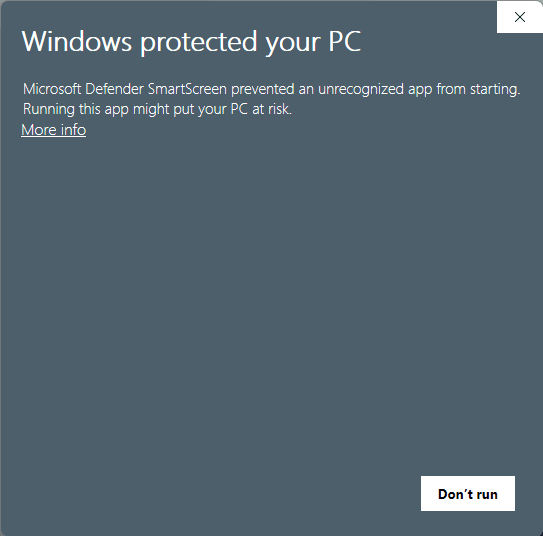
- Click More info
- Select Run anyway
- Approve the subsequent permission dialog by clicking Yes
- Follow the remaining prompts
Completion
After successfully completing these steps, Black Magic installation is finished. Insert your dongle only when the software prompts you to do so.
Need Help?
For technical issues during installation, contact the support team at support@posttimedaily.com.