Downloading Race Data
The Post Time Daily software streamlines race card downloads. Rather than using web browser downloads with multiple steps, the application facilitates past performance retrieval with minimal clicks.
Step 1: Access the Download Feature
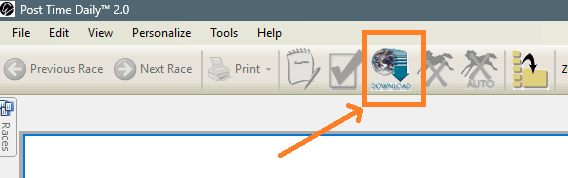
Locate the Download toolbar button positioned at the top of the Post Time Daily window.
Step 2: Select Your Race Date
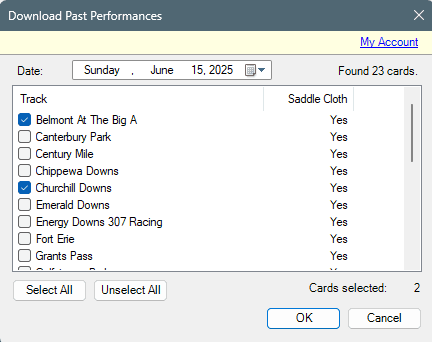
The Download Dialog appears, displaying available downloads organized by date. Choose your desired race date to view available cards.
Step 3: Check and Confirm
- Check-mark one or more cards you wish to download
- Click the OK button
- Cards automatically download and load into the software
Important Notes
Available race cards will go back the last 16 days only.
To obtain older cards, consult the Archive File pricing options.