Printing
The Post Time Daily software provides printing capabilities for various race card components. Users can access printing functions by selecting the Print toolbar button:
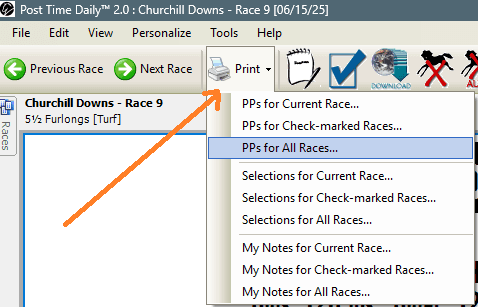
Printing Options
The software offers nine printing options organized into three categories:
Past Performances
- PPs for Current Race
- PPs for Check-marked Races
- PPs for All Races
Selections
- Selections for Current Race
- Selections for Check-marked Races
- Selections for All Races
User Notes
- My Notes for Current Race
- My Notes for Check-marked Races
- My Notes for All Races
How It Works
Each option allows users to print relevant data either for a single race, multiple selected races, or the entire race list:
- Current Race: Prints information for the race you're currently viewing
- Check-marked Races: Prints information for races you've selected with checkmarks in the race list
- All Races: Prints information for every race on the card
The selections category refers to the Super Consensus selections available within the application.
For print format options (size, what to include, etc.), see the Preferences page.